
Remote Connect
Installing the Anvil support agent lets us see and look after this machine — patching, health checks and support without needing you on the phone every time. Only install it if we have asked you to.
Installing this agent lets Anvil Solutions remotely access, inventory, patch and support this computer, and sends device and signed-in user details to our management system. Only install it on a business device you own or are authorised to manage, and only when we have asked you to.
Run the installer
Windows
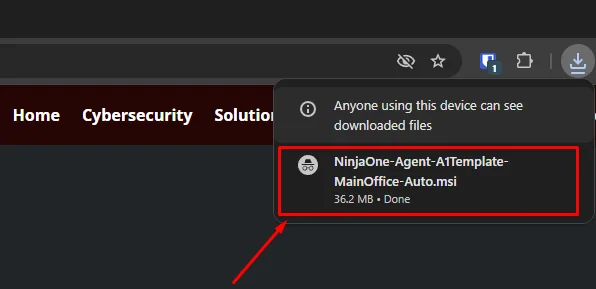
Once the download finishes, open the .msi file — usually at the bottom of your browser or in your Downloads folder.
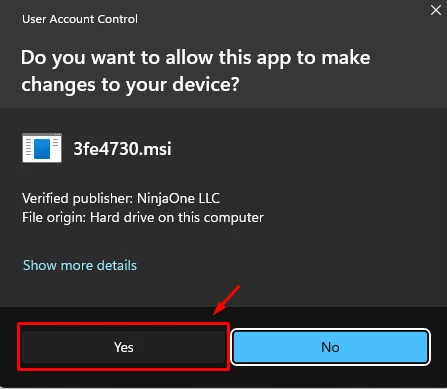
Windows will ask for permission to make changes. Click Yes. The agent installs quietly and your machine appears on our end within a minute or two. There is nothing to configure and no icon to click afterwards.
Apple / macOS
Open the downloaded .pkg file and follow the prompts. macOS may ask you to approve the installation in System Settings.
Linux
Installation varies by distribution — install the .deb package using the method appropriate to your OS, or give us a call and we will talk you through it.
Backed by partners who meet our high standards
At Anvil we don't try to do everything — we focus on what we do best and partner with those who share our vision. When we make a suggestion, it's because we trust it for our own business, too.