
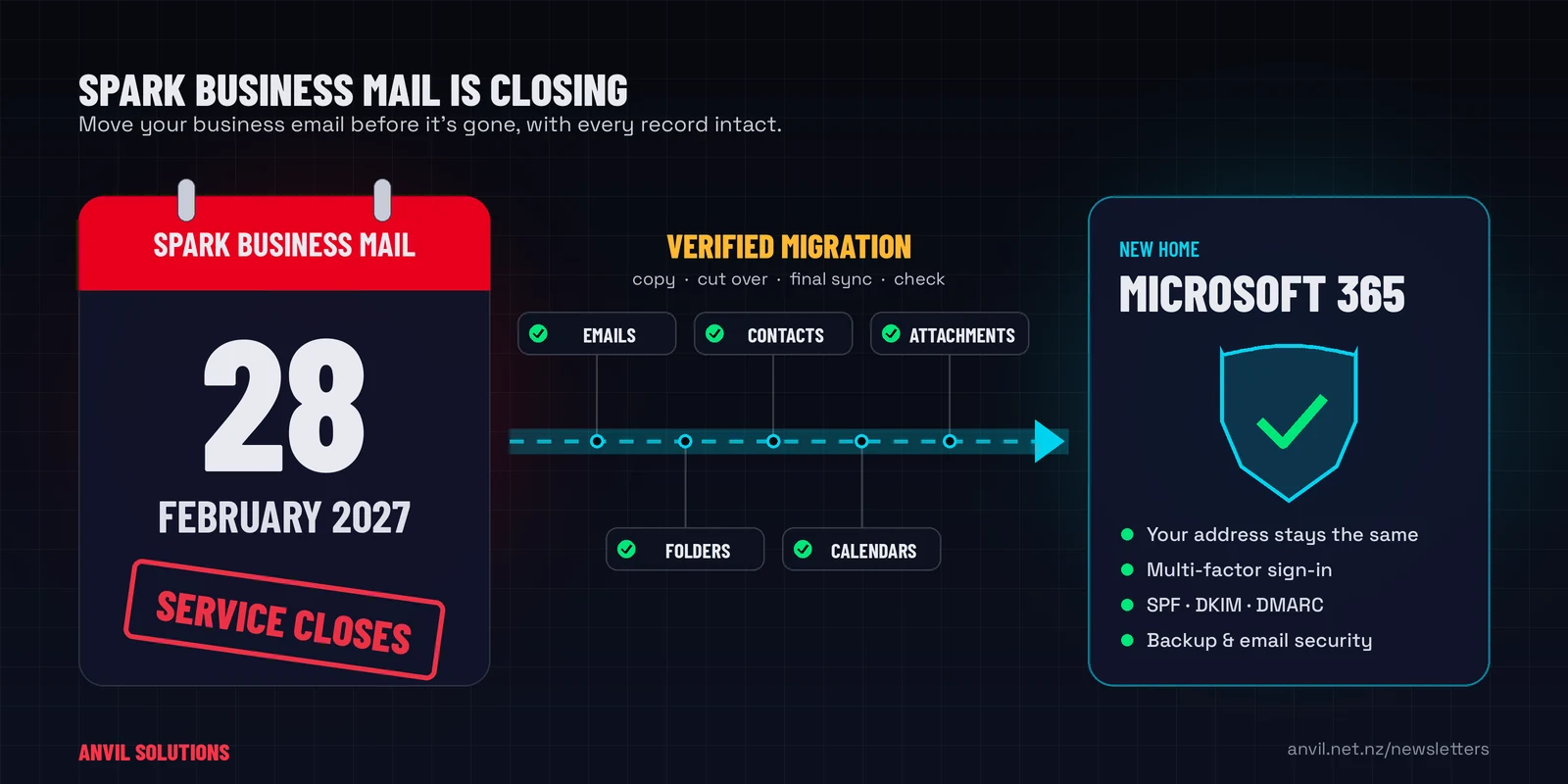
Spark has confirmed that Spark Business Mail will close on 28 February 2027. After that date you won’t be able to send or receive email through the service, or open your mailbox. Any email, folders and attachments still stored there will no longer be accessible.
If your business email runs on Spark Business Mail, you need to move it somewhere else before then. This guide explains what’s happening, what your options are, and how to make the move without losing anything.
What exactly is closing?
Spark Business Mail is the hosted email service Spark has provided to New Zealand businesses for years, often bundled with broadband. Mailboxes on it typically connect to servers such as imap.sparkbusinessmail.co.nz or pop3.sparkbusinessmail.co.nz. If you’re not sure whether you’re affected, check the account settings in your email app for those server names, or look for a letter or email from Spark about the closure.
- Closing date: 28 February 2027.
- After that date: no sending, no receiving, and no access to the mailbox or the email stored in it.
- Spark’s suggested option: moving to Everymail, a third-party email provider hosted in the USA. You don’t have to choose it. You’re free to move to any email provider.
Can I keep my email address?
In most cases, yes. If your email address uses your own business domain (for example accounts@yourbusiness.co.nz), the address belongs to your domain, not to Spark. You can move it to a new provider and keep it exactly as it is. Customers and suppliers won’t need to update anything.
What you do need is control of that domain. Before anything else, confirm who the domain is registered to, who holds the login for the domain registrar, and where its DNS is managed. We regularly find business domains registered to a former staff member, a web designer or a long-closed account. Sorting that out can take days, so it’s the first thing to check.
Your options
- Move to Everymail. This is the path Spark is pointing customers to. It may suit some businesses, but it’s worth understanding the terms, the pricing and where your data will be stored before you commit.
- Move to another basic email host. There are plenty of low-cost email-only services. They handle email, but little else.
- Move to Microsoft 365. For most businesses this is the one we recommend. You get professional email with 50 GB mailboxes, plus Outlook, Teams, OneDrive and SharePoint, multi-factor authentication, and the security controls and backup options a business platform should have. If you’re going to move once, move to something you won’t outgrow.
Whichever you choose, the move itself is the part that needs care.
Why getting the migration right matters
Your mailbox is more than a list of messages. For most small businesses it’s the record of every quote, invoice, contract, client instruction and supplier agreement the business has ever handled. Much of it can’t be found anywhere else. New Zealand businesses are generally required to keep business records for at least seven years, and a good share of those records live in email.
An email migration looks simple from the outside: copy the mail across and point the domain at the new provider. In practice, these are the mistakes we see cause real data loss and disruption:
- Email that only exists on one computer. If anyone has used POP rather than IMAP, their old email was probably downloaded to their PC and removed from the server. A server-to-server migration won’t include it. It has to be found and imported from that computer, and if that computer fails first, it’s gone.
- Missing folders, contacts and calendars. Many migration tools move the inbox and little else. Subfolders, sent items, shared contacts and calendar entries need to be checked, not assumed.
- Lost email during the switchover. When your domain’s mail (MX) records change, there’s a window where email can land in the old system, the new one, or bounce. Done carelessly, invoices and enquiries go missing and nobody notices for weeks.
- Emails going to junk. A new provider needs SPF, DKIM and DMARC set up on your domain. Skip this and your emails start landing in customers’ spam folders, or your domain becomes easier for scammers to impersonate.
- Weak security on the new accounts. A move is the moment to switch on multi-factor authentication and retire shared passwords. Skipping it carries old risks across to the new system.
- Forgotten senders. Scanners, printers, website contact forms, accounting software and alarms often send email through your old mail server. They quietly stop working after the switch unless someone updates them.
- Leaving it too late. Once the service closes, there’s no going back for anything that was missed. Spark’s deadline is fixed.
None of these are hard for someone who does migrations regularly. They’re all easy to miss if you’re doing it for the first time between running a business.
How Anvil migrates Spark Business Mail to Microsoft 365
We move New Zealand businesses onto Microsoft 365 regularly, and we treat your email as the business record it is. A typical Spark Business Mail migration with Anvil looks like this:
- Discovery. We check your domain ownership and DNS, list every mailbox and alias, and find any email held only on local computers.
- Set-up. We set up Microsoft 365 with the right licences, multi-factor authentication and sensible security defaults, and configure SPF, DKIM and DMARC so your email is trusted.
- Copy. We copy your email, folders and attachments across while Spark Business Mail is still running, so nobody stops working.
- Cutover. We switch your domain over at a quiet time, then run a final sync to catch anything that arrived in between.
- Verify. We compare mailboxes before and after, set up Outlook on computers and phones, and update printers, scanners and apps that send email.
- Protect. We can add Microsoft 365 backup and email security, so your records are safer after the move than before it.
You keep your email address. Your team keeps their history. And you don’t cancel anything with Spark until we’ve confirmed everything has arrived.
What to do this week
- Confirm whether your business uses Spark Business Mail.
- Find out who controls your domain name and DNS.
- Ask your team whether anyone keeps email only on their computer.
- Don’t delete or cancel anything yet.
- Talk to us about a migration date that suits your business, well before February.
If your business is on Spark Business Mail, call us on 09 579 5432 or email support@anvil.net.nz. We’ll check your set-up, explain your options in plain language, and move you to Microsoft 365 with your data intact. You can also read more about our Microsoft 365 services.